How it works

From scattered notes to one calm Dashboard

Set it up once, then update it as quotes, invoices and extras arrive. No macros, no add-ins.

Before · scattered

Estimate in a phone note: “Kitchen ~ A$12k?”
Quote PDF in email: cabinets A$11,500
Text from builder: “extra waterproofing +A$420”
Bank transfer: deposit A$3,450, for which job?

After · one Dashboard

Sample Dashboard key figures: total budget, contingency, committed, actual spent, remaining, expected final cost and left to commit.

The “before” notes are illustrative.

Three steps

Set up your project

Enter the project name, currency (AUD, USD, GBP, CAD or NZD), total budget and contingency %.

Track every line

Log estimate → quote → actual. Record extras and payments. Compare up to three quotes.

Watch the Dashboard

See what’s left, what’s committed and where the project is heading.

01

Get warned before you’re over budget

Set your total budget and contingency %. The Dashboard shows Remaining budget, Committed and Expected final cost. The Early warning looks at what you’ve booked and been quoted, so it can flag trouble before you pay. That matters: in Houzz’s 2026 U.S. study, 37% of homeowners who renovated in 2025 exceeded their budget. Source: Houzz (PDF)

Sample figures

A$45,000 budget + 10% contingency = A$49,500
Committed A$26,740 · Expected final A$41,790
Remaining A$39,110 · 18.1% used · On track

You hear about it while it’s still a quote, not after the money’s gone.

The real Dashboard with sample data: key figures, Budget status and Early warning both On track, and the Estimated vs Actual chart.

What-if: raise the carpet quote from A$3,100 to A$11,000. Expected final cost becomes A$49,690, over the A$49,500 budget, so Early warning shows HEADING OVER BUDGET while Budget status still says On track.

What-if copy of the sample, not the shipped file: Budget status On track, Early warning HEADING OVER BUDGET in honey amber.

02

See every overrun the day the invoice lands

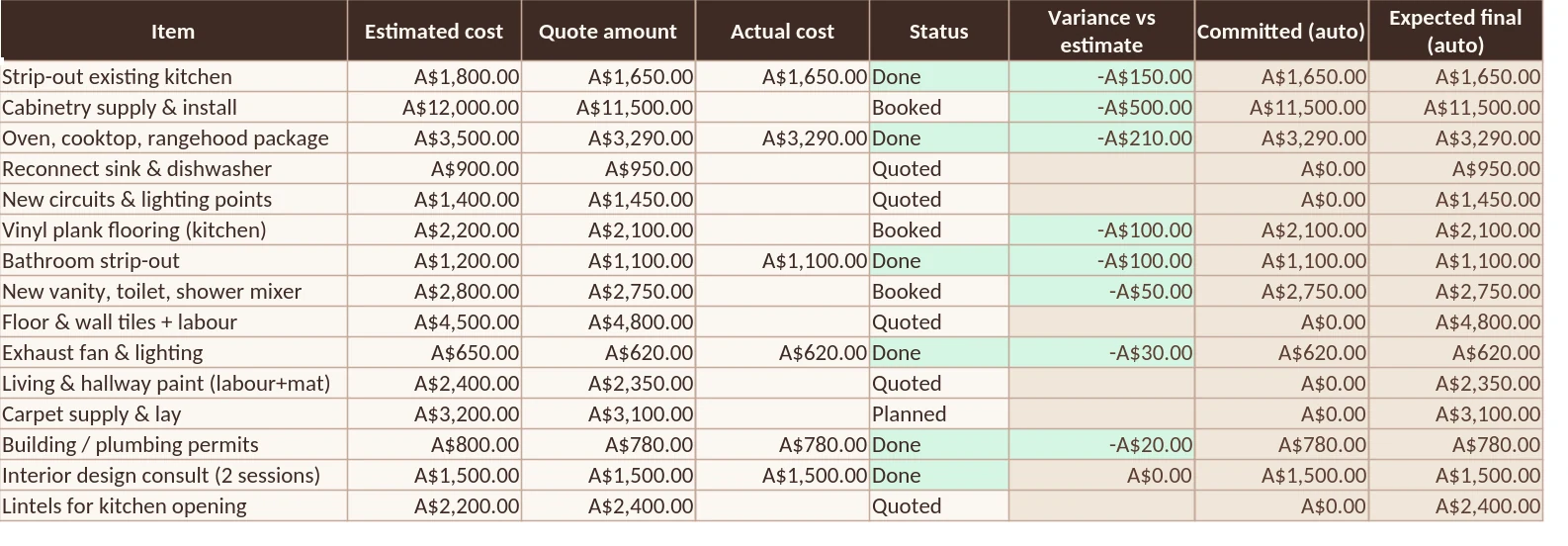
On the Budget sheet, Estimated, Quote and Actual sit side by side on each line. Variance appears once a job is booked or done, and the Dashboard totals it as Drift on costed items.

Worked example

Estimated A$4,300 · actual A$4,900
Variance +A$600 (+14.0%)

There’s still time to query the invoice or trim another line.

Sample Budget sheet: all 15 lines with Item, Estimated, Quote, Actual, Status, Variance, Committed and Expected final.

03

Know what’s paid and what’s still owed

Log each payment with date, payee, item, amount and reference. Paid to date and Balance owing fill in on the matching Budget line, and every payment is checked: ✓ Matched or ⚠ Not on Budget.

Sample figures

Cabinetry: quote A$11,500 · paid A$3,450
Balance owing A$8,050 · all 10 payments matched

No paying a deposit twice, and no surprise final bill.

Sample Payments rows showing item, amount and the Matched to Budget column with a tick and Matched.

What-if: type a payment as “Oven package” instead of the Budget item’s name and it’s flagged ⚠ Not on Budget, and counted on the Dashboard.

What-if copy of the sample: a payment typed as Oven package is flagged Not on Budget in red.

04

Keep extras from snowballing

Each change gets a date, description, linked item, reason, cost and Approved (Y/N). Only approved extras come off Remaining budget. Unapproved ones stay visible as a separate total.

Sample figures

4 variations, A$1,730 in total
Approved A$1,450 · waiting A$280

Every extra has a price and a yes or no.

Sample Variations rows: each change with its cost and Approved Y or N.

05

Compare quotes like for like

Line up to 3 quotes per job. The Quotes tab finds the Lowest amount and Lowest supplier, highlights it, and shows the Spread between highest and lowest.

Sample figures

Cabinetry: A$11,500 · A$12,200 · A$10,950
Lowest A$10,950 · spread A$1,250

You see the price gap before you sign, then weigh it against scope and timing.

Sample Quotes rows: three quote amounts per job with the lowest highlighted, including cabinetry at A$11,500, A$12,200 and A$10,950.

06

Know where the money has gone

The Payments log keeps a dated record with payee, method and reference, plus Total paid. The Dashboard breaks estimated, quoted and actual spend down by category and by room.

Sample figures

10 payments across 7 budget items
Total paid A$12,390

One file you can share with your partner or builder.

Sample figures come from the made-up example project already in the workbook, in A$. The +A$600 invoice is a worked example. “What-if” shots are a copy of the sample with one figure changed to show a warning. None of these are customer stories or promised savings.

What’s in the download

One zip file. No subscription, no account to create.

Excel workbook (.xlsx)Cream inputs, shaded formulas, sample rows you delete
Google Sheets copySame formulas, ready for File → Import
11-page illustrated User GuideScreenshots and a full worked example
Quick Start PDFSet up the same day
Free launch bonus: Renovation Budget ChecklistPrintable 4-page PDF: hard ceiling, contingency, quote comparison, payment log and weekly review — included with every purchase

Ready for a calmer renovation budget?

One workbook, built for Excel & Google Sheets, plus the free Renovation Budget Checklist.

US$29.99 one-time · 30-day refund

Email me at launch

Checkout opens soon. Email us and we’ll reply when it’s live.

Secure checkout by Paddle once live

Questions first? Read the FAQ